

304.1. Red sequence of a galaxy cluster#
For the Portal Aspect of the Rubin Science Platform at data.lsst.cloud.
Data Release: Data Preview 2
Last verified to run: 2026-09-21
Learning objective: Identify the red sequence of a galaxy cluster in a color-magnitude diagram.
LSST data products: Object table, deep_coadd HiPS map
Credit: Originally developed by the Rubin Community Science team.
Please consider acknowledging them if this tutorial is used for the preparation of journal articles, software releases, or other tutorials.
Get Support: Everyone is encouraged to ask questions or raise issues in the Support Category of the Rubin Community Forum.
Rubin staff will respond to all questions posted there.
1. Introduction#
This tutorial explores the galaxy cluster PSZ2 G309.43-72.86 (in the DDF ELAIS S1 field), which was detected by the Planck satellite through the Sunyaev-Zel’dovich (SZ) effect. Galaxy clusters are important probes of cosmology, and a large fraction of their member galaxies are red, passive galaxies that form a tight sequence in the color–magnitude diagram, known as the “red sequence.”
This tutorial performs a cone search around the cluster, makes a color-magnitude diagram of galaxies, identifies the red sequence, and inspects individual galaxies in the deep coadd images.
Central coordinates: (RA, Dec) = 10.2082, -44.1307 degrees
1.1. Log in to the Portal Aspect of the RSP. In a web browser, navigate to data.lsst.cloud and select the “Portal” panel.
2. Query the Object table#
2.1. Go to the catalog query interface.
Click on the “DP1 & DP2 Catalogs” tab.
Confirm that the “Table Collection (Schema)” is dp2 and the table is dp2.Object, and that the view is set to “UI assisted”.
2.2. Set the spatial constraints.
At left, expand the “Spatial” panel.
Set “Spatial Type” to “Single Object” and “Shape Type” to “Cone Shape”,
enter 10.2082, -44.1307 (the center of the cluster) in the “Coordinates or Object Name” field, and set the radius to 10 arcminutes.
2.3. Select columns and set constraints.
In the schema interface table (labelled “Output Column Selection and Constraints”), tick coord_ra, coord_dec, g_cModelMag, r_cModelMag, i_cModelMag, and refExtendedness to return those columns.
In the “constraints” field for refExtendedness type =1 to return only extended objects (“galaxies”),
and in the “constraints” field for r_cModelMag type <21 to return only bright galaxies.
Click the funnel icon at the top left of the table to collapse it to just the selected rows, as in Figure 1.
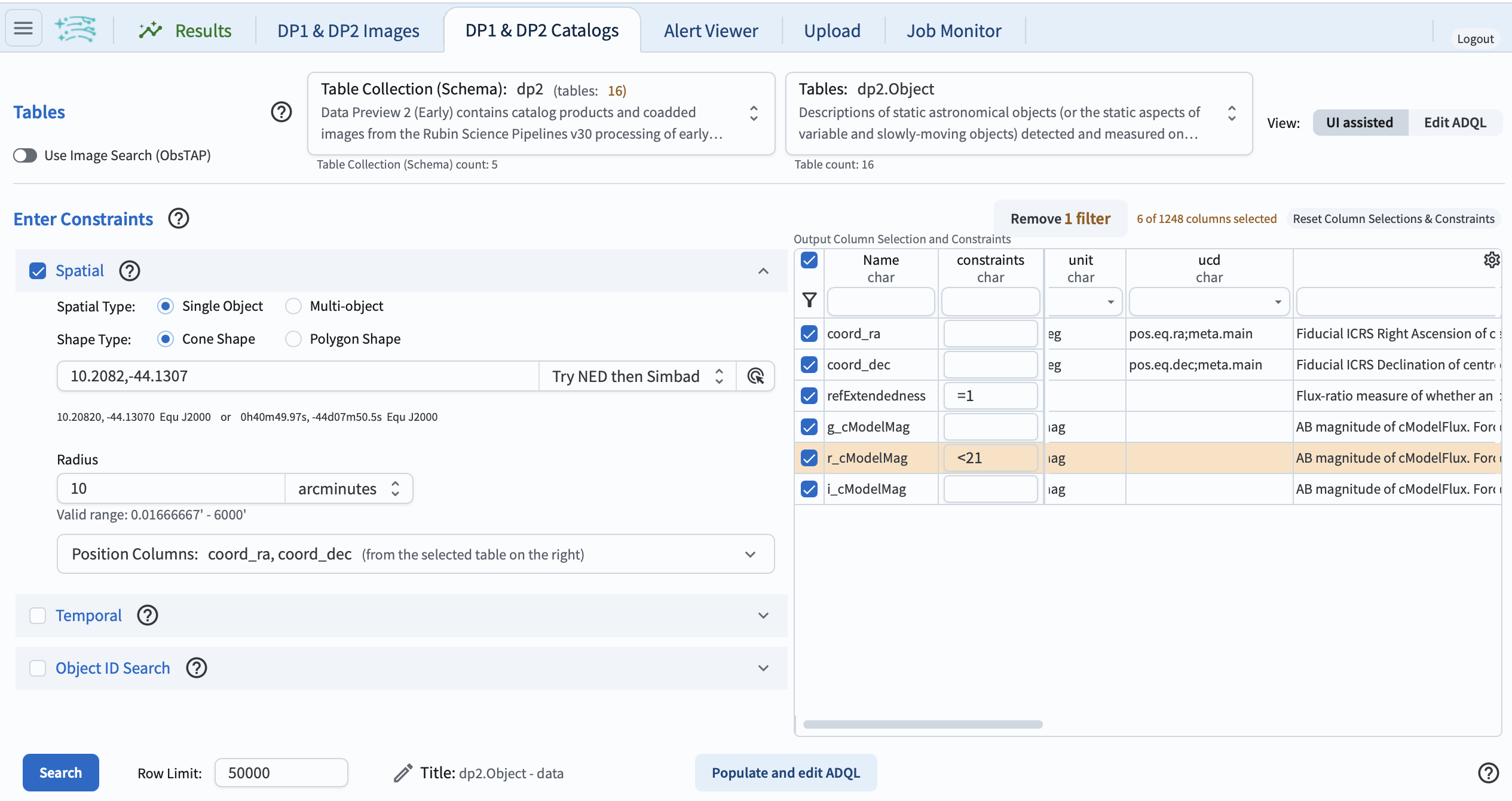
Figure 1: The query for galaxies around PSZ2 G309.43-72.86, set up in the UI.#
2.4. Execute the search.
At lower left, click the blue button labeled “Search”.
The query returns 551 rows of the Object table.
3. Make the color-magnitude diagram#
3.1. Create a color-magnitude diagram.
In the “Active Chart” panel, click the icon of the plus sign in a circle (under the “Active Chart” text; Figure 3) to open the “Add New Chart” pop-up window.
Choose “Plot Type: Scatter”, and use magnitude (r_cModelMag) on the x-axis and color (r_cModelMag-i_cModelMag) on the y-axis.
Set the X Min, X Max values to 17, 22, and the Y Min, Y Max values to 0, 1 under “Chart Options”.
Click “OK”.
3.2. Identify the red sequence. The resulting plot should look like Figure 2. The cluster red sequence appears as a narrow, nearly horizontal band of galaxies at r-i of about 0.6, extending from the bright cluster galaxies to fainter magnitudes.
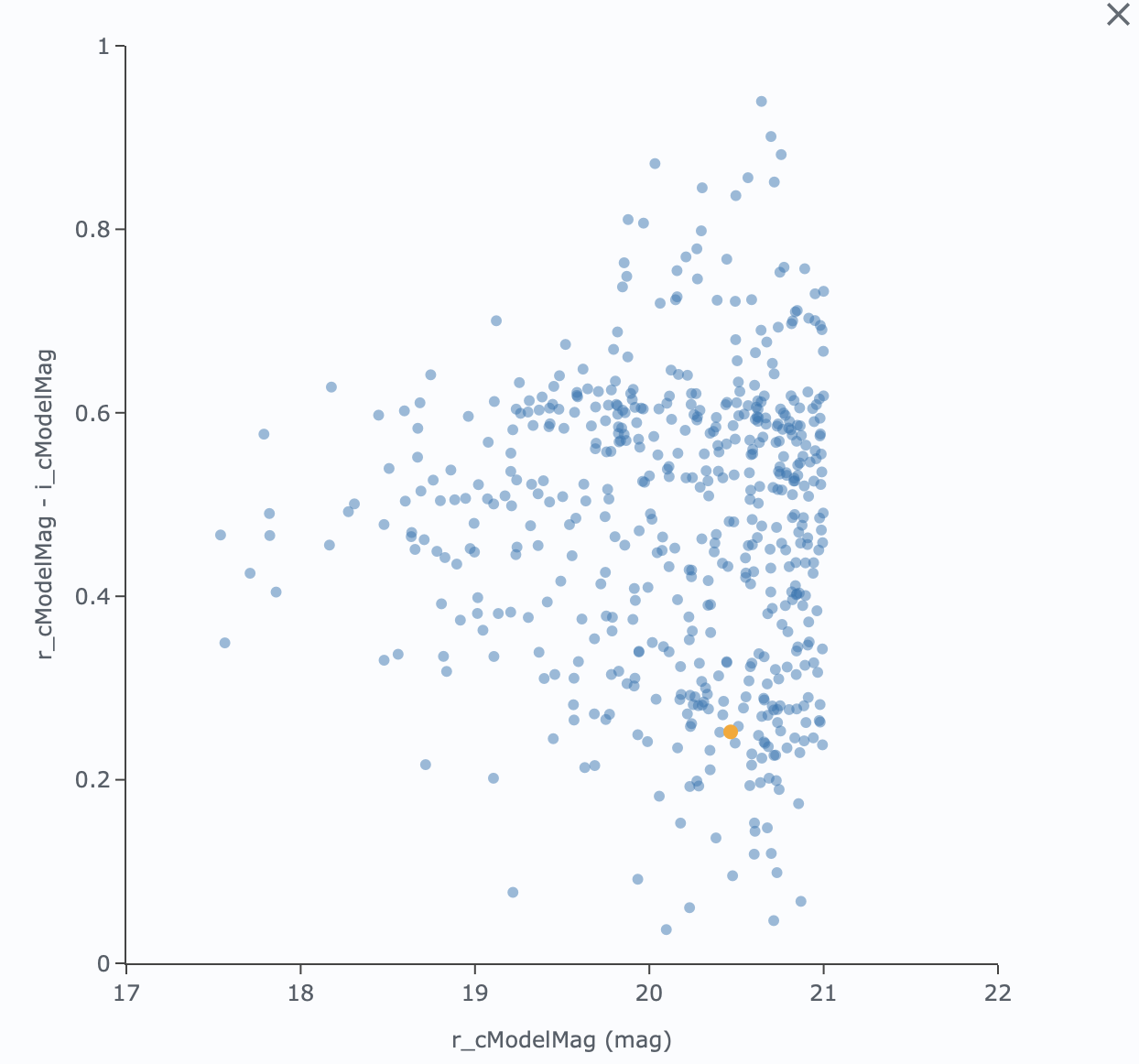
Figure 2: The color-magnitude diagram of galaxies around PSZ2 G309.43-72.86, showing the cluster red sequence.#
4. Inspect galaxies in the coadd image#
4.1. Select a galaxy on the red sequence. Click on any point along the red sequence in the color-magnitude diagram. It will be colored orange and highlighted in the table panel and in the coverage map.
4.2. View the galaxy in the coverage map.
The coverage map displays the gri color HiPS map of the pretty_coadd images.
Zoom in on the highlighted object to view the galaxy, as in Figure 3.
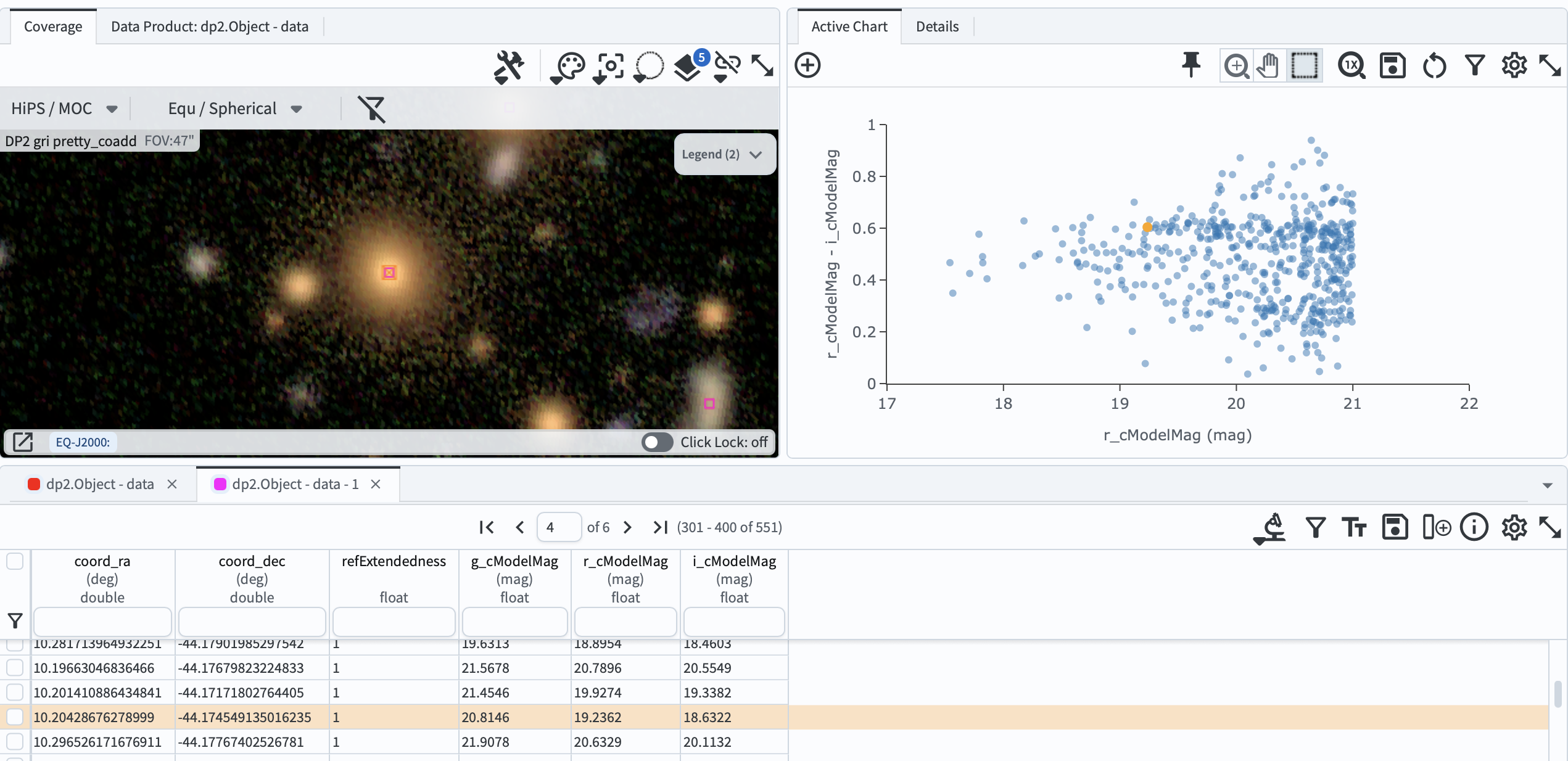
Figure 3: A red-sequence galaxy selected in the color-magnitude diagram and highlighted in the gri color coadd in the coverage map.#
4.3. Compare with other galaxies. Select a few more points on and off the red sequence, and compare the appearance of the galaxies in the coverage map.
5. Exercises for the learner#
Try making the color-magnitude diagram using g_cModelMag-r_cModelMag instead, and compare how clearly the red sequence stands out.